
 Games
Games


D2R Offline Terror Zones: How to Break the Rotation and Farm What You Want
category:Diablo 2: Resurrected
Jul-30-2026 Source: MMOSO
Within Diablo II: Resurrected, Terror Zones stand as one of the most reliable avenues for acquiring premium endgame loot alongside massive experience gains. While online gameplay forces participants to adhere to rigid server timetables for rotating Terror Zone locations, offline single-player mode delivers unparalleled flexibility over this core mechanic.
This walkthrough covers everything offline players need to dominate Terror Zone farming. We will explain how to unlock the feature, manually switch to your favorite terrorized areas, list all online vs offline mechanical differences, break down the /players command’s farming impact, and detail all solo-focused balance changes from Patch 3.2. We also share simple, actionable tips to boost your farming efficiency every run.
How to Unlock Terror Zones for D2R Offline Single Player
Before farming Terror Zones on your single-player save, you must complete a mandatory unlock step for your chosen difficulty.
- Defeat Baal at the end of Act 5 on the difficulty you plan to farm.
- Return to the character selection screen after beating the boss.
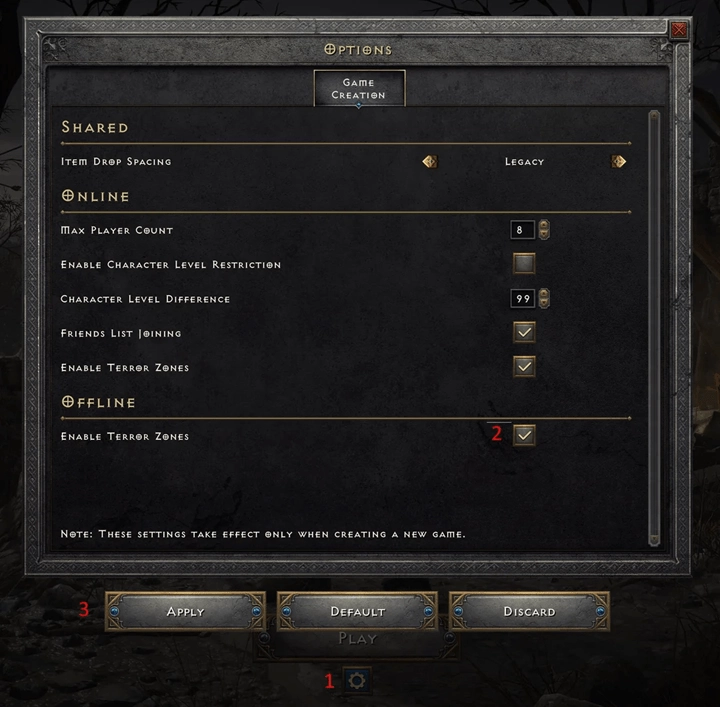
- Click the gear-shaped settings icon at the bottom of the menu.
- Tick the box labeled "Enable Terror Zones" to activate the mechanic.
- Load your character back into the game, and Terror Zones will spawn normally.
Step-by-Step Guide to Force Custom Terror Zones Offline
Recent D2R updates cut the default Terror Zone rotation timer from 60 minutes to 30 minutes. This change lets more locations turn terrorized within 24 hours and shortens waiting times for popular farming spots.
Even with faster natural rotations, offline players can edit local game files to lock in any Terror Zone they want. This tweak skips all waiting cycles, perfect for players who only farm one specific area repeatedly. Below is the full setup process.
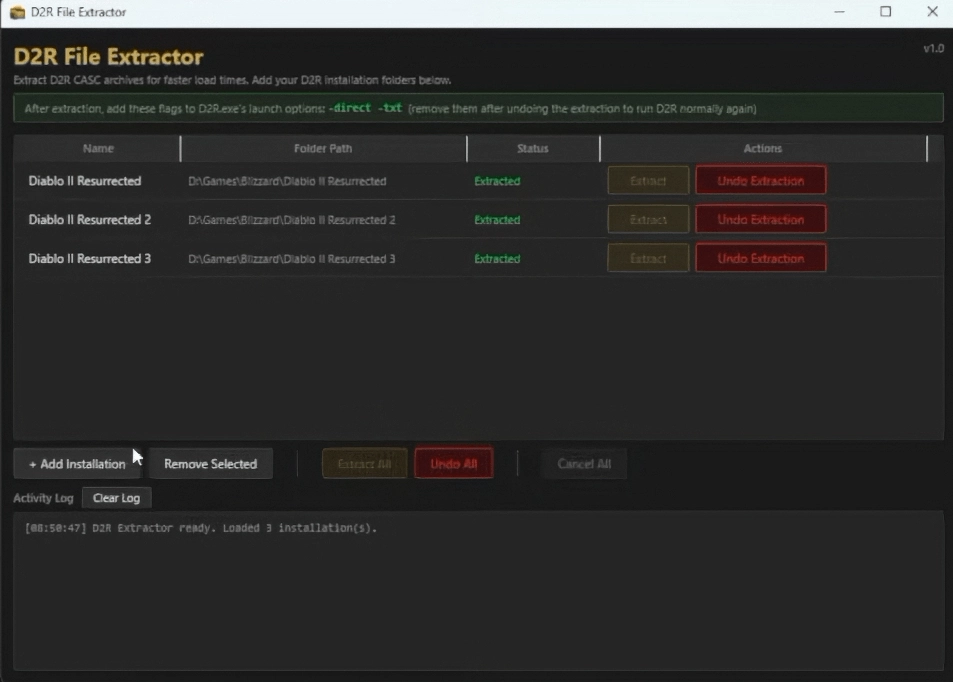
Step 1: Download and Run D2R Extractor
D2R Extractor was originally built to reduce PC loading times, but we use it to unpack editable game asset folders. Download the tool and extract your full D2R installation files to access zone configuration documents.
Step 2: Edit the Desecrated Zones Text File
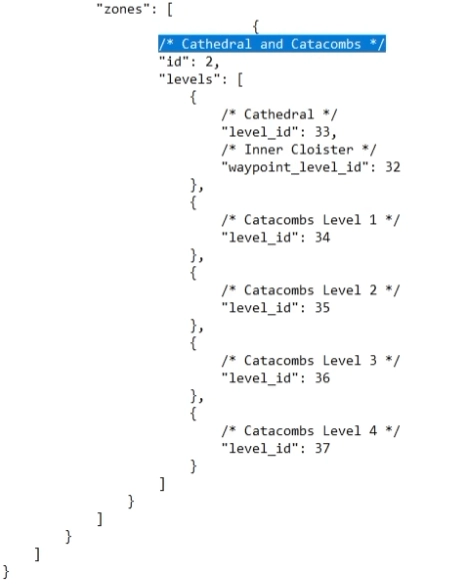
Follow this file path inside your extracted game folder: Data -> hd -> global -> excel. Open the desecrated zones file with Notepad and scroll down to the "zones" section.
Add your preferred farming areas here by copying the standard format template. Look up the official level ID for every zone you want to spawn, then save all edits to the file.
Step 3: Adjust Battle.net Launcher Settings
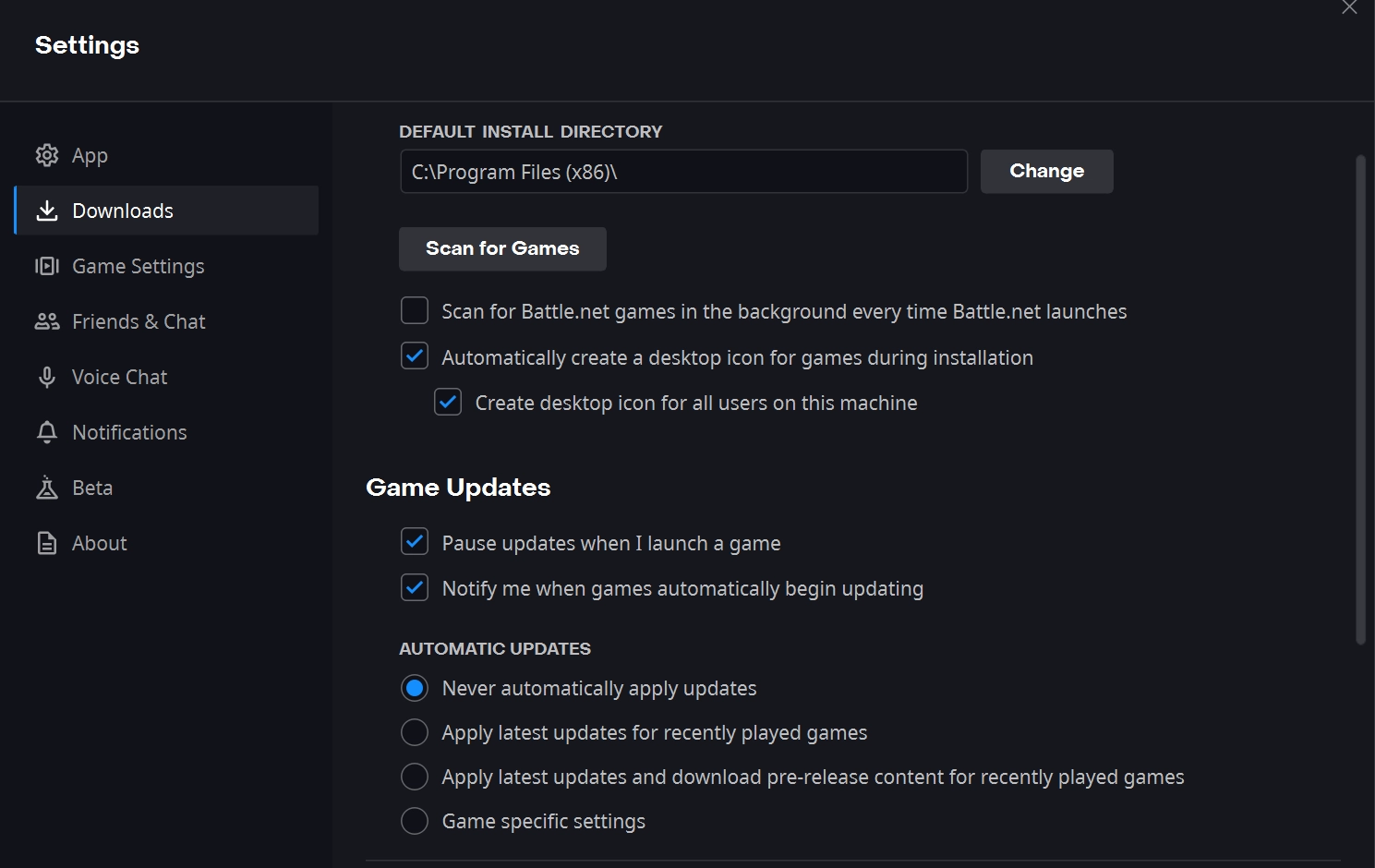
If you launch D2R through Battle.net, disable automatic game updates first.
- Open Battle.net download settings.
- Check "Never Automatically Apply Updates".
Game patches overwrite local installation files and erase all manual edits to your zone list, so this step is mandatory.
Next, open D2R’s game settings and find "Additional command line arguments". Enter -direct -txt with one space separating the two tags. These parameters make the game read your modified local files instead of default packed assets, keeping your custom Terror Zone list active while speeding up map loads.
Step 4: Modify Desktop Shortcut Launch Options
Players using a desktop shortcut instead of Battle.net need separate adjustments.
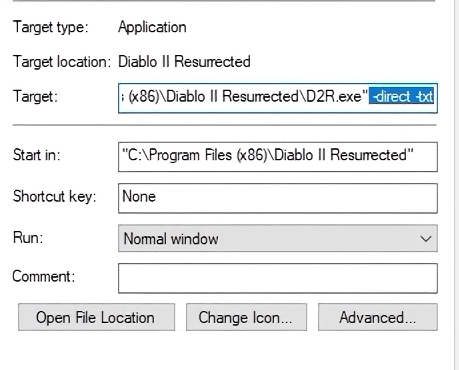
- Right-click your D2R shortcut and open Properties.
- Navigate to the Target input box.
- Add a single space after the closing quotation mark, then type -direct -txt.
- Save the property changes to finish setup.
Key Rules for Manual Terror Zone File Modding
- Always turn off Battle.net auto-updates; patches delete all local edits and require re-extracting game files.
- Do not skip -direct and -txt launch arguments in either launcher or shortcut settings.
- Blizzard may patch this editing trick out in future updates, but it works fully on the current live game version.
- Old clock-based rotation workarounds no longer function on modern D2R builds.
Core Differences Between Online and Offline Terror Zones
Below table clearly compares all core gameplay differences between online and offline Terror Zone modes.
| Comparison Item | Online Mode | Offline Single Player Mode |
| Terror Zone Rotation | Controlled by remote servers; zones may shift without prior notice | Fixed predictable cycle; dedicated offline zone trackers available |
| Multiplayer Support | Create or join lobbies with real human players | Solo-only gameplay, no multiplayer access |
| Player Count Control | Loot & EXP scaling depends on actual players in the game | Adjust freely via/players Xcommand without other players |
| Map Layout Rule | Every new game generates brand-new random maps | Map layout stays unchanged until active Terror Zone rotates |
| Item Trading System | Complete player-to-player trading economy available | No trading feature exists for single-player saves |
| Latent Sunder Charm Drops | Spawn in Terror Zones and regular non-terrorized areas | Same drop pool as online; charms cannot be traded to others |
How the /players X Command Boosts Terror Zone Loot
The biggest advantage of offline single-player mode is unlimited access to the /players X console command. This tool simulates extra players in your game instance, adjusting monster health, damage, experience rates and item drop odds.
When farming Terror Zones, this command directly raises your chance of finding rare high-value D2R endgame gear. Reference the table below to pick the best player count for your build.
| Command Setting | Suitable Build Type | Core Pros |
| /players 8 | High-survivability, fast clear speed builds | Max EXP gain, highest rare item drop rate |
| /players 5 | Balanced mid-tier builds | Balanced loot reward and combat difficulty |
| /players 3 | Squishy low-defense builds | Lower monster stats, stable farming efficiency |
This command resets fully every time you exit and reload your game. To lock in permanent player scaling, add -players X to your Battle.net launch arguments instead of typing the slash command in-game. Save the settings, and your chosen scaling value activates automatically each offline session.
Patch 3.2 Solo Player Balance Changes for Terror Zones
Patch 3.2 rolled out major updates focused on offline and solo Terror Zone farmers, covering Herald spawns, charm drop rates and player scaling mechanics. All adjustments are sorted in the table below.
| Adjustment Category | Full Patch Notes |
| Herald Spawning Rules | Killing any monster can trigger a Herald hunt; spawn chance rises continuously as you clear more mobs in one Terror Zone |
| Latent Sunder Charm Drop Buffs | Charms drop from all monsters (terrorized & regular zones); Tier 1+ Heralds greatly increase charm drop odds |
| Worldstone Shard Drop Rework | Shard drop rates no longer affected by simulated or real player count; benefits all solo players |
| Player Count Loot Scaling Fix | Latent Sunder Charm and Worldstone Shard drops decoupled from player number scaling |
| High-Tier Herald Stat & Loot Tweaks | Tier3/4 Heralds = 2x charm drop chance; Tier5 =3x chance. Herald health bonus cut from 500% to 250%; damage bonus down from 50% to 250% |
Important Reminder: All Herald of Terror encounters are locked behind the D2R Reign of the Warlock DLC. You must purchase this expansion to encounter these elite enemies inside Terror Zones.
Practical Tips for Fast Offline Terror Zone Farming
Follow these straightforward strategies to maximize loot and experience during every offline Terror Zone run.
Track Offline Terror Zone Rotation Timetables
Online and offline Terror Zone schedules run independently. Tools like D2Emu provide accurate real-time offline rotation trackers. Use these resources if you do not want to edit game files to force custom zones.
Pick Balanced High-Performance Character Builds
Terror Zone monsters paired with Herald spawns create tough combat scenarios. Prioritize builds with both high damage output and solid defensive survival stats.
Test Adjustable /players Scaling Gradually
Start with /players 3 to check if your build can handle boosted monster stats. If clearing packs stays smooth, raise the player simulation value step by step. Lower the number if constant deaths or extremely slow clears ruin your farming flow.
Watch Visual Cues for Upcoming Herald Spawns
Recent patches increased Herald spawn frequency within all Terror Zones. Clear large monster packs to trigger these elite encounters faster. Keep an eye out for storm lightning floating above dead enemies — this visual signal means a Herald will spawn in five seconds, so prepare your defenses immediately.
Frequently Asked Questions About Offline Terror Zones
How Often Do Unmodified Single Player Terror Zones Rotate?
If you skip editing local game configuration files, offline Terror Zones switch locations every 30 minutes, matching the rotation timer used for all online game lobbies.
Can Players Get Sunder Charms While Playing Offline?
Yes. On the current live game version, Latent Sunder Charms drop from nearly all monsters across the world, whether you farm active Terror Zones or standard non-terrorized maps.
Does /players X Improve All Item Drop Chances?
This command lowers the base "NoDrop" value for every monster loot pool. Higher simulated player numbers reduce cases where monsters drop zero items, raising your overall total loot quantity on the ground.
Recommended news
-
Diablo 2 Resurrected Assassin Leveling Guide: Trapsin Skills and Gear
Oct-28-2026 -
D2R Season 15 Nova Sorceress Build Guide: Skills and Gear
Oct-15-2026 -
D2R Season 15: Hex: Purge Echoing Strike Warlock Build for Terror Zone Farming
Oct-13-2026 -
Diablo 2 Resurrected: Best Magic Find Locations to Farm
Oct-10-2026 -
Diablo 2 Resurrected Cold Sorceress Build: A Detailed Look at Cold Skills and Immunity
Oct-09-2026 -
Diablo 2 Resurrected S15: How to Defeat the Colossal Ancients
Sep-29-2026


Thank you for using this website through social login. In order to better use the functions of mmoso, please add your email address first. If you have questions, please consult our customer service.


